MCP compatibility
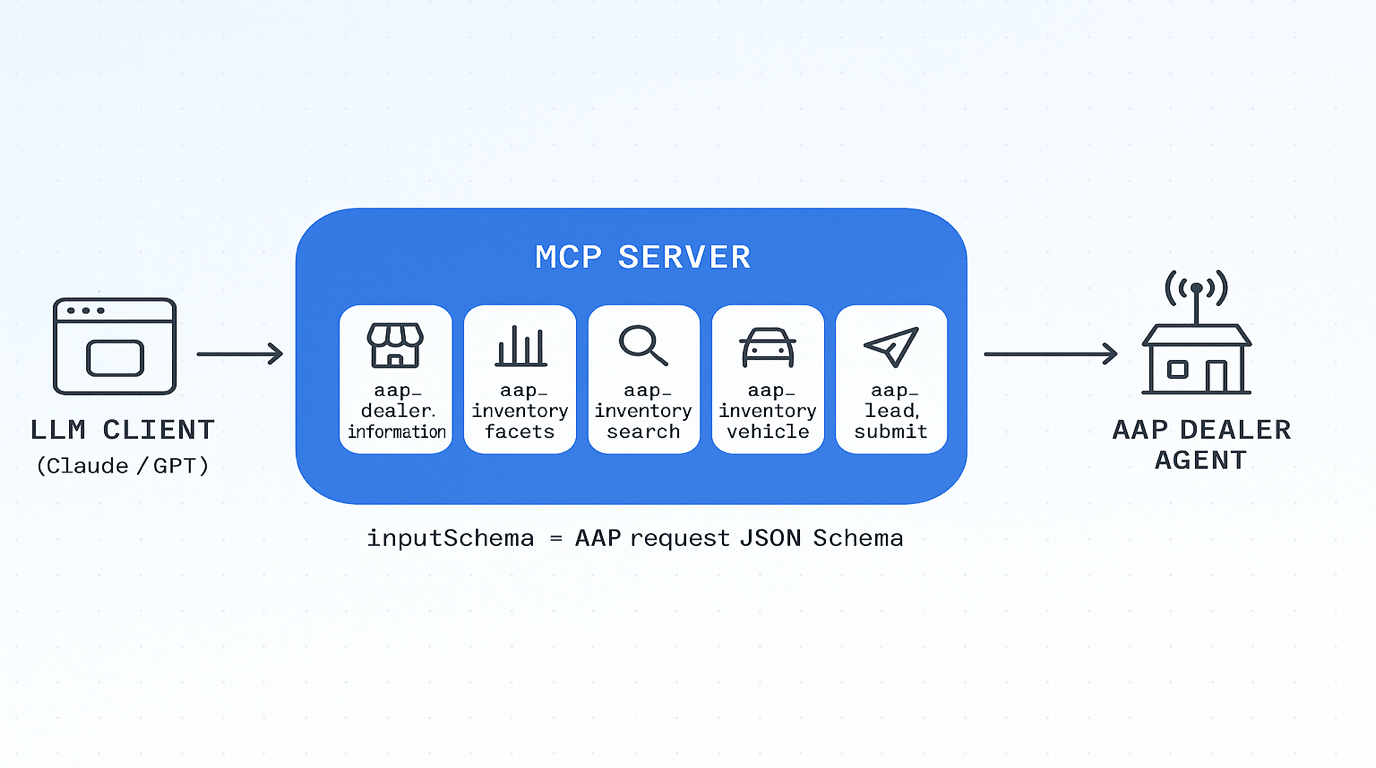
Model Context Protocol (MCP) is a tool layer between an LLM client and a host application. AAP exposes its five skills as MCP tools so any MCP-compatible LLM client (Claude Desktop, an MCP-aware IDE, or a custom orchestrator) can call a dealer agent without learning the A2A wire format directly.
The MCP server acts as a thin adapter: it accepts an MCP tools/call request whose arguments is exactly an AAP request payload, wraps it as a typed DataPart inside an A2A Message, and forwards it to the dealer agent's A2A endpoint. The MCP tool's inputSchema is the AAP request schema by URL — no extra wrapping, no field renaming.
Tool naming
Each AAP skill maps to one MCP tool. The tool name pattern is:
aap_<skill_id_with_underscores>
Dots become underscores. The mapping is fixed for v0.1:
| AAP skill id | MCP tool name |
|---|---|
dealer.information | aap_dealer_information |
inventory.facets | aap_inventory_facets |
inventory.search | aap_inventory_search |
inventory.vehicle | aap_inventory_vehicle |
lead.submit | aap_lead_submit |
Tool input is the AAP request payload
The MCP tool's inputSchema is the AAP request schema (referenced by URL). The MCP server passes arguments directly through as the AAP request — no envelope, no extra wrapping. The MCP server is responsible for:
- Validating
argumentsagainst the request schema (best practice but optional). - Wrapping
argumentsasMessage.parts[].datawithkind: "data". - POSTing it to the dealer's A2A endpoint over the configured binding (JSON-RPC or HTTP+JSON).
- Unwrapping the dealer's A2A
Messageresponse and returning the AAPdatapayload as the MCP tool result.
The MCP tool result is the AAP response payload (the same thing the dealer returned in parts[0].data).
MCP manifest structure
A complete MCP server descriptor that exposes all five AAP skills as tools:
{
  "name": "auto-agent-protocol",
  "version": "0.1",
  "description": "MCP server descriptor that exposes Auto Agent Protocol automotive skills as MCP tools. Each tool's input matches the corresponding AAP request schema; the wrapper invokes the dealer's A2A endpoint with the same payload as a typed DataPart.",
  "protocolVersion": "2025-06-18",
  "tools": [
    {
      "name": "aap_dealer_information",
      "description": "Return dealership profile, locations, brands, business hours, contact policies, and supported services.",
      "inputSchema": {
        "$ref": "https://autoagentprotocol.org/v0.1/schemas/dealer-information-request.schema.json"
      },
      "annotations": {
        "aap_skill_id": "dealer.information",
        "aap_request_type": "dealer.information.request",
        "aap_response_type": "dealer.information.response",
        "aap_response_schema": "https://autoagentprotocol.org/v0.1/schemas/dealer-information-response.schema.json"
      }
    },
    {
      "name": "aap_inventory_facets",
      "description": "Return aggregated facets (makes, models, years, conditions, body styles, price ranges, mileage ranges, drivetrain, fuel type) over the dealer's inventory.",
      "inputSchema": {
        "$ref": "https://autoagentprotocol.org/v0.1/schemas/inventory-facets-request.schema.json"
      },
      "annotations": {
        "aap_skill_id": "inventory.facets",
        "aap_request_type": "inventory.facets.request",
        "aap_response_type": "inventory.facets.response",
        "aap_response_schema": "https://autoagentprotocol.org/v0.1/schemas/inventory-facets-response.schema.json"
      }
    },
    {
      "name": "aap_inventory_search",
      "description": "Search vehicle inventory by query, make, model, trim, year, condition, price, mileage, body, VIN, stock, features, and availability.",
      "inputSchema": {
        "$ref": "https://autoagentprotocol.org/v0.1/schemas/inventory-search-request.schema.json"
      },
      "annotations": {
        "aap_skill_id": "inventory.search",
        "aap_request_type": "inventory.search.request",
        "aap_response_type": "inventory.search.response",
        "aap_response_schema": "https://autoagentprotocol.org/v0.1/schemas/inventory-search-response.schema.json"
      }
    },
    {
      "name": "aap_inventory_vehicle",
      "description": "Return details for a specific vehicle by VIN, stock number, or vehicle_id, including availability, pricing disclosure, media, mileage, trim, features, and dealer page URL.",
      "inputSchema": {
        "$ref": "https://autoagentprotocol.org/v0.1/schemas/vehicle-detail-request.schema.json"
      },
      "annotations": {
        "aap_skill_id": "inventory.vehicle",
        "aap_request_type": "inventory.vehicle.request",
        "aap_response_type": "inventory.vehicle.response",
        "aap_response_schema": "https://autoagentprotocol.org/v0.1/schemas/vehicle-detail-response.schema.json"
      }
    },
    {
      "name": "aap_lead_submit",
      "description": "Submit a consented lead carrying customer info plus any combination of vehicle of interest, trade-in, and appointment request. Replaces the legacy lead.general / lead.vehicle / lead.appointment trio.",
      "inputSchema": {
        "$ref": "https://autoagentprotocol.org/v0.1/schemas/lead-submit-request.schema.json"
      },
      "annotations": {
        "aap_skill_id": "lead.submit",
        "aap_request_type": "lead.submit.request",
        "aap_response_type": "lead.submit.response",
        "aap_response_schema": "https://autoagentprotocol.org/v0.1/schemas/lead-submit-response.schema.json"
      }
    }
  ]
}
A reference manifest is generated from spec/v0.1/skills.yaml at build time and published as generated/v0.1/mcp-manifest.json.
Calling a tool
An MCP client invokes tools/call with the AAP request as arguments:
{
  "jsonrpc": "2.0",
  "id": "mcp-1",
  "method": "tools/call",
  "params": {
    "name": "aap_inventory_search",
    "arguments": {
      "type": "inventory.search.request",
      "filters": {
        "make": ["Honda"],
        "condition": ["used", "cpo"],
        "year_min": 2020,
        "price_max": 30000
      },
      "pagination": { "skip": 0, "limit": 20 },
      "sort": { "field": "price", "order": "asc" },
      "privacy": { "anonymous": true }
    }
  }
}
The MCP server forwards arguments as the AAP DataPart.data to the dealer's A2A endpoint and returns the dealer's AAP response payload (the contents of the response data block) as the MCP tool result.
Why this matters
- LLM clients that already speak MCP gain instant access to every AAP-compliant dealer agent through a one-line server registration.
- The MCP
inputSchema$refpoints at the AAP schema by URL, so an LLM with schema-following tool use can plan calls against the same source of truth as a hand-written A2A client. - The MCP server is stateless adapter glue; all business logic — auth, consent enforcement, inventory accuracy — stays in the dealer agent behind A2A.
For more on MCP itself, see the MCP specification. For the A2A bindings the MCP server forwards into, see JSON-RPC binding and REST binding.